Having an AI chat specialized in the Crossover hiring process to answer your questions and solve your issues can significantly reduce the time it takes to get help while you're applying for a role.
Even in cases where Crosby can't fully solve your issue, explaining it to Crosby lets it do an initial triage, pull up the details of your own application or account, and gather the relevant information before creating a support ticket for the right Crossover team. This avoids your request landing in the wrong queue and speeds up resolution.
How Do I Access Crosby?
Getting started is as simple as signing in. Crosby lives in the support chat bubble in our candidate Help Center — sign in with the same account you used to apply, and start the chat.
Signing in matters: Crosby identifies you by your account, which lets it look up your own application, assessment, and account details and resolve far more on the spot.
What Can It Do?
You might wonder, "Can it handle my specific issue?"
Crosby is built for candidates and applicants. Here are a few examples of what the AI tool can do for you:
- Answer questions about applying for a job at Crossover and how the hiring process works
- Check the status of your application and explain a review, cancellation, or rejection
- Help with the assessment process (CCAT/PCCAT), including scheduling and accommodations for a disability
- Handle grading disputes and score-reflection issues
- Manage your account: identity verification, name changes, account deletion, and unsubscribing from notifications
- Troubleshoot sign-up, login, and account-access problems
- Answer policy and process questions (deadlines, equipment requirements, and more)
- and more...
Crosby Best Practices
To maximize the probability of having a productive interaction with Crosby we recommend you follow some basic "best practices":
1. Sign in with the email address you used to apply
Make sure you're signed into the Help Center with the same email tied to your Crossover application. This allows Crosby to access your application and account details, which lets it solve more issues directly. If you applied via LinkedIn, that's your LinkedIn email.
2. Describe the issue in detail from the beginning.
Similar to what you would do when raising a ticket.
| ✅ "I tried to start my assessment but the Start button is greyed out and nothing happens" ❌ "assessment issue" |
3. If Crosby doesn't understand your question, rephrase it.
Don't repeat the exact same phrase again
| "How can I change my details?" Crosby: "Can you please provide more details or ask differently?" ✅ "I need to update the name shown on my Crossover profile" ❌ "How can I change my details?" |
4. If you are offered buttons, use them.
If there is a button that aligns with the response to you want to give, we'd always recommend using them as this way there is no ambiguity as to what you mean.
| Crosby: "What's happening with verification? (Verification failing) (Account locked) (Check my status)" ✅ <<Press the (Account locked) button>> ❌ "the locked one" |
5. Don't ask for an agent without letting Crosby try to solve your issue.
Crosby is trained in many common scenarios and can check things in the backend and perform actions on your account. You would be surprised! Even if Crosby can't solve your request, it will gather the right context and create a ticket for the relevant team, reducing your wait time.
We are continually monitoring cases that Crosby doesn't resolve and implementing new features so you might find Crosby can solve something it couldn't when you tried before.
| Crosby: "How can I help?" ✅ "My ID verification keeps failing and I can't continue my application." ❌ "I need an agent" |
6. Don't panic!
We know that Crosby is not perfect and we are 100% dedicated to improving it. If Crosby is unable to help you, and you confirm with the buttons that the solutions provided didn't help, it will create a support ticket so the right team can follow up. Crosby is ticket-only — there's no live chat, so it won't "transfer" you; it hands your issue, with full context, to a human who'll pick it up.
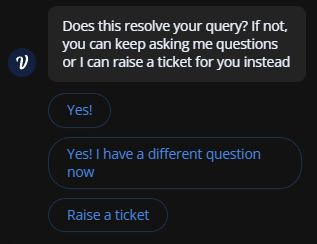
If you've already tried explaining the issue more than once, without success, you can also ask Crosby to create a ticket for an agent.
Ahmet Metin Birgili
Comments